
Duke students, faculty and staff and most affiliates with a Duke NetID have off-campus access to many online resources, such as databases and e-journals. Patrons can use the following methods for access.
Access via the Library Website
Begin your search at the Medical Center Library & Archives Website. Starting from the Library Website ensures you are on the best path to connect to online resources already available to you through the library. Before accessing a licensed online resource, you will be prompted to log in using your Duke NetID. Please Note: A small subset of Duke's online resources are restricted by license agreements and cannot be accessed from off-campus. Please Ask a Librarian if you want more information.
Access via the Duke Health VPN
Use https://vpn.duhs.duke.edu/, the Duke Medicine Web-based VPN
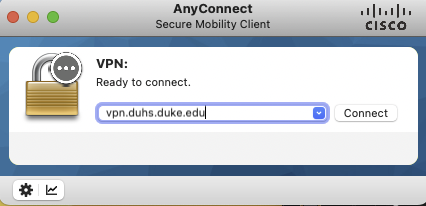
- Request access from the IT manager or LAN Administrator for your department or contact the DHTS Help Desk at 919.684.2243 or 800.684.2243.
- Log in to https://vpn.duhs.duke.edu/ using your DHE username and password.
- The Duke Medicine network and clinical systems, including the Duke Medicine VPN, use Multi-factor authentication (MFA). You will be asked to type a second password to access our resources.
- Need Help? See the DHTS Documentation Website or contact the DHTS Help Desk at 919.684.2243 or 800.684.2243.
Tools & Plugins
The following Tools & Plugins may simplify access to articles, depending on your workflows. We encourage you to explore them!
- Google Scholar
- Google Scholar is a search engine that allows users to look for scholarly materials on a topic. Instead of searching the entire Web like Google does, Google Scholar searches the scholarly literature provided by numerous academic publishers, professional societies, universities and scholarly organizations. Search results include citations from peer-reviewed journals, theses, papers, books and technical reports. For the most part, Google Scholar provides citation-only results. The full-text of an article or book can be accessed by using the Get it @ Duke link.
- If you are using Google Scholar from off campus, you will need to set your "Scholar Preferences" to Duke University Libraries.
- To learn more, access Using Google Scholar (from Duke University Libraries)
- Libkey Nomad
- Nomad is a browser plugin for Firefox, Google Chrome, Brave, Edge, and Vivaldi that can help you find journal articles quickly and easily. Nomad connects your Duke Libraries access to articles found while browsing in Wikipedia, PubMed, or directly on publishers’ Websites. Once you install the plugin, it will scan the sites you read online for journal article identifiers. When it sees an article that is available through Duke, it provides easy PDF or link access with a consistent, easy-to-find button. Links bring you to a fully accessible article page – no further login required. PDFs can be downloaded directly to your computer.
- Learn more: Find Article PDFs Faster with This Browser Plugin (from Duke University Libraries)
- Unpaywall
- Unpaywall is a service that maintains a database of links to full-text articles from open-access sources all over the world. The content is harvested from legal sources including repositories run by universities, governments, and scholarly societies, as well as open content hosted by publishers themselves. Please note that Unpaywall will not work for newspaper articles.
FAQs
- How do I connect to the Duke University VPN?
Use https://portal.duke.edu/, the Duke University Web-based VPN
- Set the VPN Login Department drop down menu option to Library Resources Only,
- Then log in using your NetID and Password.
- Once connected, you can use Library resources as if you were on campus.
- If you haven't changed your NetID password in some time, you may need to change your NetID password using this link in order to connect, even if your password works on some other resources.
- Need Help? See OIT's Documentation Website, their list of service outages, or contact the OIT Help Desk at 919.684.2200.
Note: Micromedex and Lexicomp are behind a Duke Medicine firewall and will not work with this option.
- Do you need access to Library resources from a mobile device?
Download the free Cisco AnyConnect app for your device. The Web-based VPNs will not work on mobile devices.
- Download the iPhone/iPad/iPod app from the iTunes store and configure it using the instructions from the OIT Documentation Website. An Android app is also available for download from Google Play.
- Need Help? See OIT's Documentation Website or contact the OIT Help Desk at 919.684.2200.
- Who is eligible for off-campus access?
- Duke students, faculty, and staff and affiliates with sponsored library access and a Duke NetID have off-campus access to many databases and e-journals.
- Who do I contact for help if I have trouble logging in with my NetID?
- NetIDs are managed by the Office of Information Technology. More information may be found on the OIT NetID page
- What happens if I start my research from off-campus in Google or another site not affiliated with Duke?
- If you start your research in Google or a non-affiliated site, you may not be able to access Duke licensed online resources. We recommend always starting your search from the Duke Medical Center Library & Archives main page.
- Online resources linked from the Library Website will begin with the following text in the URL: https://login.proxy.lib.duke.edu/login?url=
- If you don't see above text at the start of the online resource you're trying to get to from off campus, try manually inserting it at the beginning of the URL. For example: https://login.proxy.lib.duke.edu/login?url=https://jamanetwork.com/
- How do I save/bookmark links to an online resource?
- Search for the resource from the Library Website, navigate to the resource, and copy the link from the browser.
- Some resources have special procedures for creating static URLs. See Creating Links to Journal Articles for more information.
- If you have difficulty accessing any of the resources, please Ask a Librarian for assistance.
- What should I do if i find a broken link to an online resource on the Library Website?
- Please complete the "Report an Access Issue" form to let us know the details so we can address the problem and follow up
- Why do some library licensed online resources have additional login options (e.g. ClinicalKey, etc.)?
- Some online resources offer additional features, such as saving search results or chapters, to users who set up a Duke login and password. These are not required for basic access to the resource and are managed entirely between the user and the resource platform. Your Duke NetID and password will not work for access within the tools for these additional features.
- Does the EZProxy software track my use of library resources?
- The EZProxy system provides off campus access to licensed online resources based on IP authentication. Though it uses IP addresses to verify authorized users, it does not track your identity or Duke NetID.
- What online resources are available for alumni use?
- Duke University Libraries provide alumni access to a subset of online resources available off campus for personal, non-commercial use. For more information please visit the Duke Alumni Library Online Access page.
- Still need help?
- Please contact User Services for more assistance